🧮 Abacus Simulator
Click or tap beads to move them — heaven bead slides down, earth beads slide up
Quiz Settings
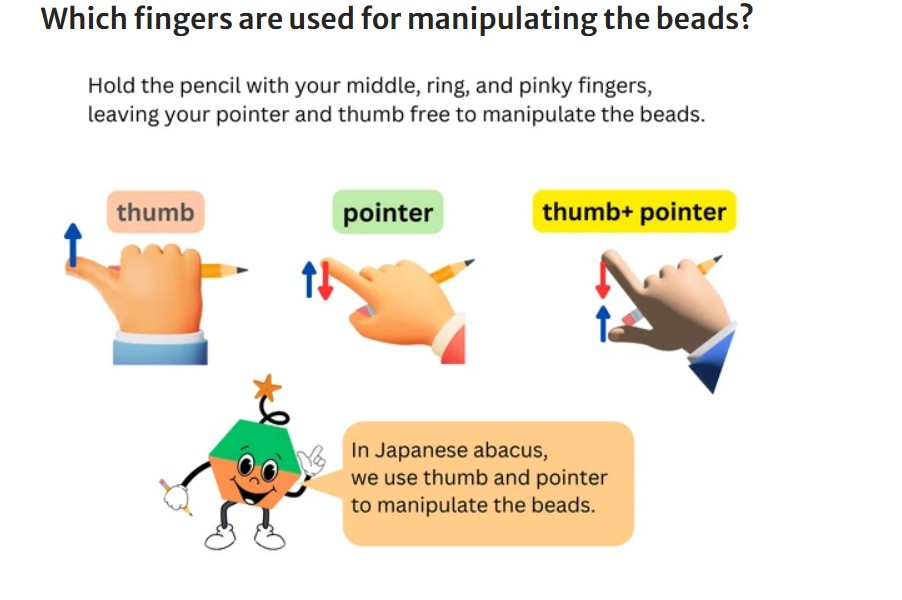
✍️ Which Finger to Use?
Hold your pencil with middle, ring & pinky fingers — keep thumb and pointer free to move beads.
👍 Thumb pushes lower beads UP — for adding 1, 2, 3 & 4
+1
⚪
1 bead
+2
⚪⚪
2 beads
+3
⚪⚪⚪
3 beads
+4
⚪⚪⚪⚪
4 beads
☝ Pointer — for adding upper bead (+5) and subtracting lower beads (-1 ~ -4)
+-5
▲
▼
⚫
upper bead
-4
▼
⚪⚪⚪⚪
4 beads down
-3
▼
⚪⚪⚪
3 beads down
-2
▼
⚪⚪
2 beads down
-1
▼
⚪
1 bead down
for adding and subtracting the upper bead "5" — for subtracting the lower beads "1 ~
4"
💡
Tip:
Watch the
👍 / ☝
hint that appears when you click a bead — it shows which finger to use!
How to use the Abacus Simulator
🟡
Gold bead (top)
— click to slide DOWN to the bar = 5. Click again to slide back up = 0.
🔴
Red beads (bottom)
— click any bead to activate it and all beads above it. Click an active bead to
deactivate from there up.
👆
Use the
Set
button to jump to any number instantly. Try entering 12345 and clicking Set.
📊
Right column = ones, moving left = tens, hundreds, thousands, and so on up to 100
million.
⚪
White dot
on the beam =
ones (unit point)
. Gold dots mark thousands and millions — just like a real abacus.
Want to learn proper abacus technique with a certified teacher?
Book Free Trial View Abacus Programs